ROLE:
LEAD UX DESIGNER
TIMELINE:
Q1–Q2 2025
TEAM:
SILVER SNEAKERS SQUAD
PLATFORM:
RESPONSIVE WEB

Helping more americans claim social security with confidence
Redesigning Fidelity's Social Security Benefits Calculator to serve a far broader audience than it was built for, without losing the people it already served.
background
In 2017, Fidelity's Social Security Benefits Calculator was built for one kind of customer: a higher earner optimizing for the largest possible lifetime benefit. By 2025, customer verbatim showed it had quietly outgrown that brief. People with much lower incomes were leaning on it too, facing an irreversible decision where getting it right mattered more than getting the most, with no second chance to fix it.
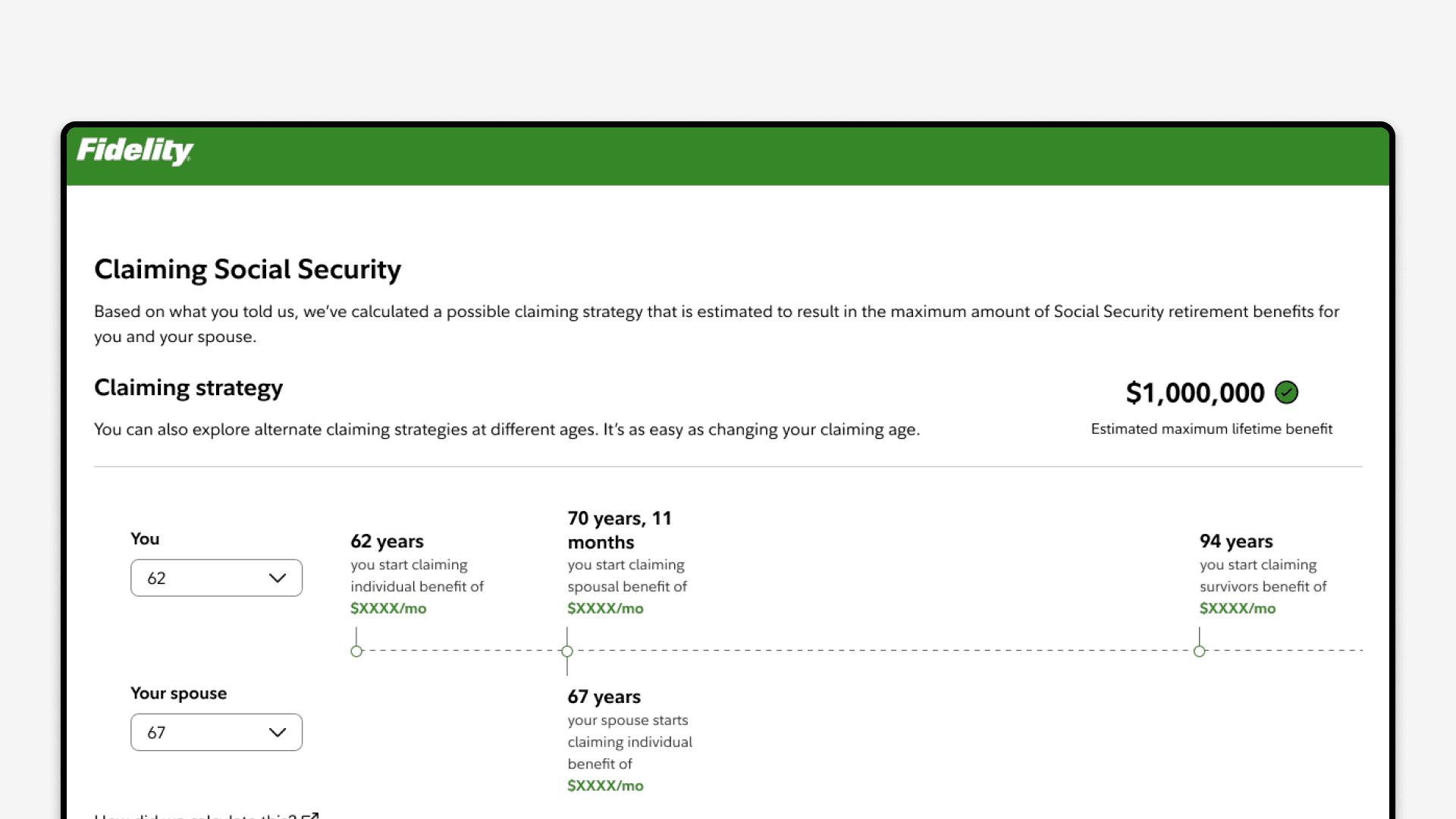
I led the redesign that widened the tool to reach them while keeping it just as strong for the optimizers it was built for, and built the capability people asked for most: comparing claiming scenarios and seeing the break-even year.
For confidentiality reasons, I have omitted or generalized certain business metrics and internal data throughout this case study.
context
A tool that outgrew its original design
Social Security is the foundation of retirement for most U.S. households. It pays guaranteed income for life and rises with inflation, and for many Americans it's the largest single source of money they'll live on after they stop working.
The SSBC was built to help higher earners squeeze the most out of that income, modeling claiming ages from 62 to 70 across individual, spousal, and survivor benefits. For that audience, it worked. The trouble showed up as the tool got popular. Usage spread well beyond the segment it was designed for, and the experience that served optimizers so well left everyone else underserved.
the challenge
Make a high-stakes decision clear for people who can't afford to get it wrong
Claiming Social Security is one of the few money decisions you can't take back. Claim too early out of confusion and you can lock in a permanently smaller check for the rest of your life. The customers now relying on the tool, many of them lower-income, were exactly the people for whom that mistake costs the most.
The goal wasn't simplification for its own sake. The decision is genuinely complex, and the job was to make it understandable at every income level without stripping out the depth the original users relied on. Concretely, the redesign had to make the trade-offs clear to someone seeing it for the first time, let people compare scenarios and see when waiting actually pays off, and cut the friction in a flow that had grown too long.
the reframe
From "add a feature" to rethinking the experience
The brief I was handed was narrow: add break-even comparison to the existing tool. Survey results and advisor feedback had flagged it as the single most-requested feature, so the ask made sense on its face.
The deeper I got, the more that request looked like a symptom. People weren't only short a comparison view, they were short the clarity to make the decision at all, which is why so many of them ended up calling an advisor to do it for them. A feature bolted onto the old flow would have satisfied the request and missed the point.
So I reframed the work around one question:
How might we make the options clear enough that people can decide with confidence on their own, without needing to call an advisor?
That question justified far more scope than the original ask. I advocated for redesigning the whole flow rather than the outcome page alone: consolidating it so people weren't buried in detail, treating comparison as core to the experience, and building it so the same foundation could later stretch to new user segments. That was a much bigger commitment than the team was first asked for, and the research is what made the case for it.
discovery
Finding the whitespace
Before proposing anything, I mapped the full journey from entry to outcome, so the team could see where the experience broke down rather than where we assumed it did. In parallel I worked with the business team on a competitive review of SSA.gov, Schwab, Vanguard, and a handful of other providers.
The pattern was clear. SSA.gov gives official estimates but no real scenario modeling. Schwab and Vanguard offer calculators, but none let people compare multiple claiming scenarios side by side or see a break-even analysis. None of them modeled the situations real households are in: married, divorced, remarried, widowed, single.
That gap was the opportunity. Fidelity could own the most comparative, situation-aware Social Security tool on the market, which lined up exactly with what the reframe said users needed. I closed discovery with a short cross-functional sprint, pulling in product leads, business analysts, methodology specialists, and the UX chapter to align on direction and get early concepts on the table.

research
What people were struggling with
Survey results and advisor feedback kept surfacing the same handful of problems, and they mapped cleanly onto the reframe. Comparison was the number one request. People wanted to see claiming ages next to each other. The existing tool showed one scenario at a time, so they were taking notes or trying to hold numbers in their head.
"I just want to see: if I claim at 62, what do I get? If I wait until 67, what do I get? Show me both."
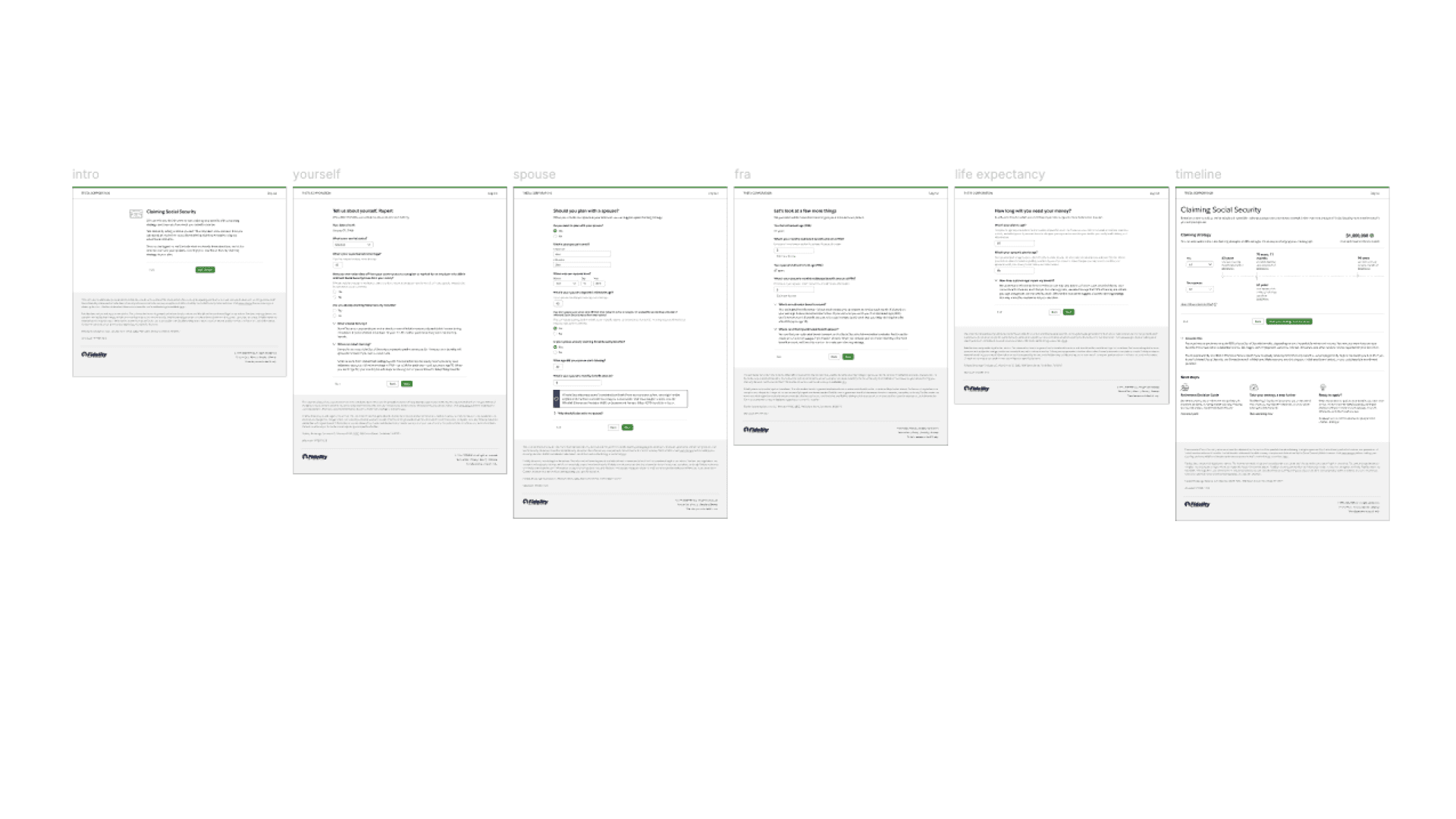
Break-even mattered most to the people weighing an early claim. Without knowing when waiting would pay off, they couldn't decide with any confidence. The flow itself was part of the problem too: the married path ran six pages, drop-off was high, and the people who finished it often felt buried in detail.
The finding that settled who we were designing for came from the lower-income users. Higher earners were optimizing for the largest lifetime benefit. Lower-income users weren't, and one of them put the real job plainly: they wanted "the smartest way to do what I have to do." The old tool had no answer for that.

validation
Three directions, and where we were wrong
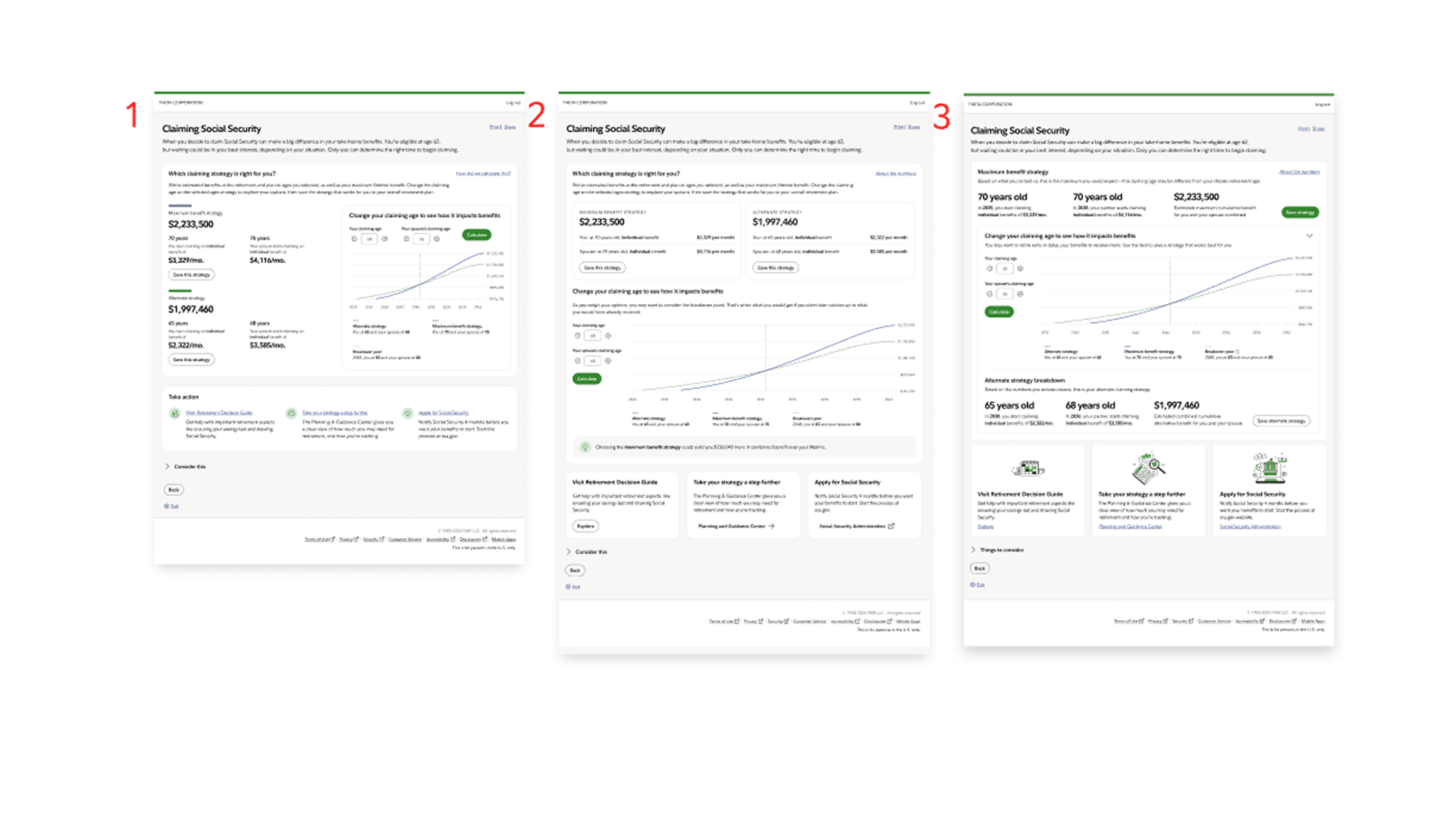
Comparison was the core of the whole redesign, so I didn't want to guess at how to present it. I designed three versions of the Claiming Strategy page and ran an unmoderated DoR test, each version with its own set of users, then showed all three side by side at the end of every session so people could react to the contrast directly.
Design A, side by side
Two scenarios in parallel columns for direct comparison.
Design B, cards on top
Summary cards above the detailed breakdown.
Design C, stacked
Scenario A above Scenario B, with adjustable controls.
Going in, the stakeholders and I expected Design C to win. The sequential, guided flow felt more educational, like we were walking people through the decision. Users wanted the opposite. They picked the side-by-side layout decisively, because seeing both options at once matched how they actually weigh a trade-off. They didn't want to be guided through the choice. They wanted to see it. That was the moment the project stopped running on our instincts and started running on theirs. Design A became the spine of the experience.
the redesign
An experience built around clarity
With the direction settled, the redesign delivered on the reframe: make the decision clear enough that people could act on it alone.
Compare at a glance
The new Claiming Strategy page puts scenarios side by side, so the comparison lives in the interface instead of in the user's memory.
See the break-even year
A break-even visualization shows exactly when waiting starts to pay off, turning an abstract idea into a number people can act on.
Understand the monthly benefit
A monthly breakdown shows what someone would receive, not just a lifetime total. It didn't exist in the old tool, and research had flagged it as essential to confidence.
Explain the why
When one strategy is clearly stronger, the tool now explains the reasoning behind it, so people can trust the recommendation instead of calling an advisor to confirm it.
Then the flow itself. I consolidated the core married path from six pages to four by combining related inputs, removing redundant confirmation steps, and using progressive disclosure to surface complexity only when it was needed. Accessibility was a design decision from the first concept rather than a retrofit. Aligning early with Pixel Peppers and A11y throughout meant the final Governance pass had little to flag.
impact
Impact, before launch
The redesign is in development, targeted for Q4 2025, so there's no production analytics yet to set against the old tool. What I can show is concrete and structural. The core married flow is 33% shorter, four pages instead of six, with no loss of the information users needed. That reduction targets the drop-off the research exposed. The direction is validated, not assumed. The central comparison model was chosen by users over the version the team first preferred, so the riskiest decision in the redesign was settled before a line of production code.
The comparison pattern also proved general enough to travel. I carried it into a separate product, for a different team with different stakeholders, and the SSBC research backed the decision to use it again.
Built on the research, the experience is designed to reduce mid-flow drop-off and to cut the advisor escalations that came from people who couldn't decide on their own. I'm calling those expectations rather than results, because that's what they are, and I'd rather say so plainly than dress a projection up as an outcome.
For confidentiality reasons I've omitted specific business figures. The shape of the improvement is real; the absolute numbers stay internal.
(The full experience is built on the current FDS, which matters for consistency and maintainability across the Lifetime Financial Help area.)
reflection
What I took away
Trust is what earns you scope
I came onto this project after other designers had already cycled through it. A steady cadence of check-ins and keeping stakeholders looped in is what built the standing to argue for a redesign much bigger than the original ask. Without that trust, the reframe stays a slide nobody approves.
Research is for finding where you're wrong, not confirming where you're right
The clearest proof was the comparison test, where the team's preferred direction lost and the work was better for it.
Documentation is a deliverable
Developers and business stakeholders treated the Figma file as the source of truth, so keeping it clean, annotated, and current was part of shipping the work, not cleanup afterward.